n8n One Click Install
Deploy n8n on your own VPS and start automating in minutes. 400+ integrations, native AI agents, and a visual workflow builder — full control, no code required.
What Is n8n? Workflow Automation Explained
Imagine connecting your apps without writing a single line of code—until you want to. That’s n8n (pronounced n-eight-n), a name born from “nodemation” that reflects exactly how it works: nodes plus automation.
You get a visual workflow builder where you drag, drop, and connect building blocks on a canvas. Each node represents a step—sending an email, querying a database, posting to Slack. You draw lines between them to define how data flows. It’s workflow automation that feels like sketching on a whiteboard instead of wrestling with syntax.
Here’s the thing: it’s yours forever. Licensed under fair-code principles with the Sustainable Use License, n8n lives on GitHub with over 194,000 stars and 59,000 forks. You can self-host it for free, keeping your data in your infrastructure. Built in TypeScript by Jan Oberhauser—who still runs the company as CEO—this isn’t vaporware that disappears overnight. Version 2.29.0 arrived in June 2026, with fresh updates dropping weekly to keep your automation tools current.
The Visual Editor That Anyone Can Use
You don’t need a computer science degree to automate your work. The canvas lets you see exactly how data moves from trigger to action when you create n8n integrations.
Each connection line tells a story of transformation. The expression system lets you grab data from previous steps using simple template syntax in any parameter field. No coding required—until you’re ready to go deeper.
Code When You Need It
Sometimes drag-and-drop isn’t enough. When you hit that wall, the Code node opens Python or JavaScript right inside your workflow.
Import any npm package. Write custom logic that handles edge cases. You’re not locked into rigid templates. You get the flexibility of coding with the speed of visual building.
Templates and Community
Why start from scratch? Over 900 n8n templates wait on n8n.io, ready to import with one click.
Need an integration that doesn’t exist yet? The n8n community has built thousands of custom nodes you can install directly from within the app. Tens of thousands of members share solutions in the forum and Discord server. Get real-time help from people who’ve already solved your exact problem.
docker run -it --rm -p 5678:5678 docker.n8n.io/n8nio/n8n
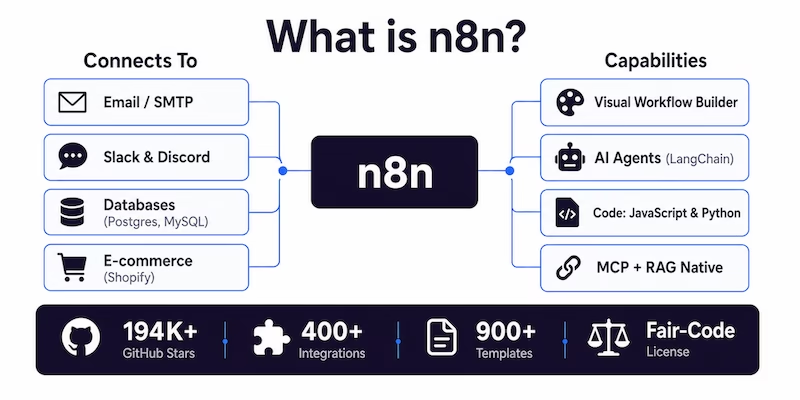
What Can You Automate with n8n?
If a task involves moving data between two or more services, n8n can automate it. From simple notifications to multi-step AI agent pipelines, the same visual canvas handles it all. Here are the most common things people build first.
Lead Automation
Capture leads from web forms, enrich them with company data, push to your CRM, and notify sales — all before you finish your coffee.
IT Operations
Monitor servers, auto-create support tickets, run remediation workflows, and post status updates to Slack without lifting a finger.
Security Operations
Aggregate security alerts, enrich them with threat intelligence feeds, and trigger response workflows in seconds not hours.
Data Sync
Keep records perfectly aligned between your CRM, email marketing platform, and database — no more copy-pasting between systems.
Content Publishing
Schedule social posts, cross-publish between platforms, and let AI generate first drafts — then route them for approval automatically.
E-commerce
Sync inventory levels, process incoming orders, send confirmation emails, and update your accounting software in one connected flow.
RAG & AI Agents
Build chatbots that search your knowledge base, answer questions with grounded context, and take real actions through tool-calling.
Backend Prototyping
Spin up API endpoints with webhook triggers and workflow logic in minutes — prototype before you commit to writing a full backend.
Report Automation
Pull data from multiple sources, aggregate it into a clean summary, format it, and email the right people on a schedule that never misses.
n8n AI: Build Agents That Actually Work
Most automation tools bolt on AI like a cheap aftermarket spoiler. n8n builds it into the chassis. You get native AI capabilities that feel intentional, not improvised. That means your n8n AI agents run smoother, debug faster, and actually ship to production instead of stalling in prototype hell.
AI Agents on Your Terms
Stop wrestling with black-box AI. The AI Agent Node puts you in control with built-in LangChain support, so your workflows route decisions precisely where they need to go.
You’re not limited to one provider either. Connect to OpenAI, Anthropic, Google Gemini, or keep everything local with Ollama. This is AI workflow automation without handcuffs.
The AI Assistant lives right in the editor. Describe what you want in plain English, and it builds the node chain for you. No syntax memorization required.
Memory makes or breaks an agent. The AI Agent Node handles tool-calling memory and multi-step reasoning natively. Your agents loop, evaluate, and retry within the workflow without external hacks. The Episodic Memory SDK keeps context persistent across interactions, so your automation remembers yesterday’s conversation.
Manage credentials centrally through the AI Gateway with usage tracking and warnings that prevent bill shock. Test rigorously with Workflow Evals using pairwise comparison and LangSmith integration. This isn’t a plugin tacked onto legacy software. It’s engineered from the ground up.
Computer Use and Browser Automation
Want your agent to actually use a computer? n8n Computer Use lets AI click, type, and read screen content just like a human operator. As of version 2.27.0, it even reads local PDFs and image files without external services.
Browser Use (available since 2.29.0) connects directly to your n8n instance. This means true browserless n8n automation where your agents navigate the web, extract data, and interact with SaaS tools without spinning up costly external browser instances. Competitors make you duct-tape Puppeteer scripts together. This works out of the box.
MCP and RAG Built In
Modern AI needs context. n8n supports MCP (Model Context Protocol) as both client and server, letting your workflows tap into external AI tools and MCP-compatible services seamlessly. No middleware. No configuration nightmares.
RAG patterns are native too. Build workflows that search vector databases and feed precise context to your LLMs, so answers come back grounded in facts, not hallucinations. While others Frankenstein together Python scripts and vector stores, you click and connect. That’s the difference when AI is native, not an afterthought.
n8n Cloud vs Self-Hosted: Which Should You Choose?
n8n gives you two paths. Let n8n run the servers for you, or run everything on your own infrastructure. Both get you the same editor, the same 400+ integrations, and the same AI agents. The difference is who manages the plumbing.
n8n Cloud — Managed, Secure, Zero Infrastructure
With n8n Cloud, you sign up, open the editor, and start building. No servers to provision, no Docker containers to maintain, no SSL certificates to renew.
Data is stored in EU servers (Frankfurt, Germany) — a critical detail for GDPR compliance. Built-in SSL, automatic backups, and infrastructure monitoring come standard.
Billing is execution-based: one execution equals one complete workflow run, regardless of how many steps it contains. A 50-step workflow costs the same as a 2-step one. That’s the opposite of Zapier, where every step burns a separate task.
Plans start at Starter (2,500 executions/month), scale through Pro, and reach Business (up to 300,000 executions) and Enterprise (custom). Automatic updates push the latest stable version without downtime.
- EU data residency (Frankfurt)
- Automatic updates, no downtime
- SSL, backups, monitoring included
- Execution-based billing, not per-step
Self-Hosting — Full Control, No Execution Limits
Self-hosting n8n means Docker is doing the heavy lifting. The recommended approach uses the official image docker.n8n.io/n8nio/n8n, maps port 5678, and stores data in a persistent volume. One command, running in minutes.
Docker Compose configurations are available in the n8n-hosting repository for architectures ranging from a single VPS to multi-instance setups. For a quick local test, npx n8n works too — just needs Node.js.
The Community edition is free with no execution limits and no feature gates on the visual builder. You can deploy to Digital Ocean, Hetzner, AWS, Azure, or any provider that runs Docker.
Self-hosting requires technical knowledge: server configuration, container management, security hardening, and database setup. n8n recommends it for expert users who want total sovereignty over their data.
- Free Community edition, no limits
- Docker image
docker.n8n.io/n8nio/n8n - Port 5678, persistent volume
- Deploy to any Docker-capable provider
Why Self-Host n8n?
When you self-host n8n, you stop renting your infrastructure and start owning it completely. Your sensitive data never leaves your servers unless a workflow explicitly sends it somewhere. Your monthly costs become predictable instead of scaling unpredictably with usage. And you finally get the freedom to build automation workflows without arbitrary execution limits or feature gates blocking your progress.
Total Privacy
Every credential sleeps behind AES-256 encryption at rest, and your self-hosted n8n instances keep all data on your own infrastructure by default — nothing leaves without explicit permission. Connect external secrets to HashiCorp Vault, enforce 2FA at the instance level, and maintain audit logs that track every workflow change without third-party eyes on your operations.
Full Control
Configure enterprise SSO through SAML or LDAP, protect against SSRF attacks with configurable blocked hostnames (v2.29.0), and manage workflows through Git source control for complete version history. Task runners execute code in isolated environments while multi-main mode provides automatic failover if your primary server goes down.
Predictable Cost
The Community Edition costs nothing to self-host yet includes full core features with no execution limits and no feature gates on the visual builder — perfect for agencies running n8n service infrastructure. Scale horizontally using queue mode to distribute workloads across multiple workers without per-operation fees or seat licenses eating into your margins.
No Limits, No Lock-in
Store binary data externally on S3 or Azure Blob Storage, run production on PostgreSQL for enterprise performance, and stream audit data to Datadog or Sentry via OpenTelemetry. Whether building internal tools or delivering n8n white label solutions to clients, you keep full access to the public REST API and complete data portability.
n8n One-Click Install — Setup in 4 Steps
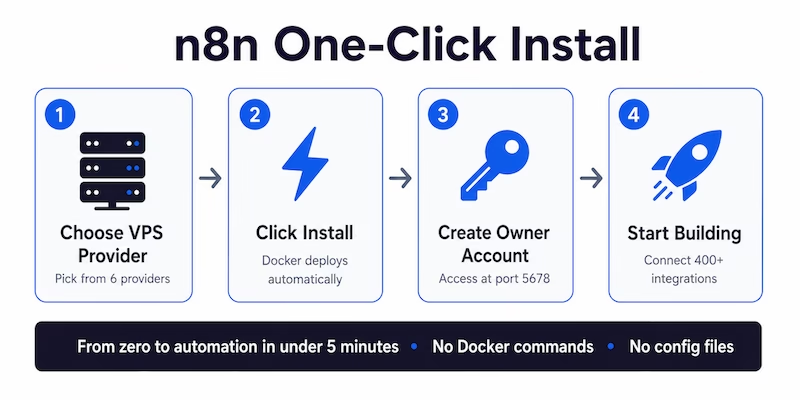
You don’t need to wrestle with Docker commands, reverse proxies, or SSL certificates. With n8n one click install, your server handles the heavy lifting automatically. No writing Dockerfiles, no manual container management, no environment variable tuning. Whether you prefer raw VPS access or hosting control panels like Plesk, this one-click deployment gets you from zero to workflow in minutes, not hours.
Choose your VPS from the comparison table that matches your performance needs and budget.
Click install — the provider automatically deploys n8n with Docker and all dependencies preconfigured.
Open n8n login at your server IP on port 5678 (or your domain), then create your owner account.
Start building — connect integrations and create workflows without touching a single config file.
Best VPS Providers for n8n One-Click Hosting
Six providers offer one-click n8n deployment. Each handles Docker, dependencies, and configuration automatically. Here’s what makes each one different.
Beginner-friendly VPS with an intuitive control panel and one-click n8n app installer. Great balance of price, performance, and support.
- 4GB RAM, 50GB NVMe storage
- 4TB monthly bandwidth
- AI assistant in hPanel
- 30-day money-back guarantee
Premium hosting with unlimited bandwidth and dedicated resources. Ideal if your n8n workflows handle heavy automation workloads.
- 4GB RAM, 80GB SSD storage
- Unlimited bandwidth
- Dedicated IP address
- Free SSL certificates
Generous resources at a low price. Contabo gives you more RAM and storage per dollar than any competitor on this list.
- 8GB RAM, 100GB SSD storage
- 32TB monthly bandwidth
- Choice of server locations
- Plesk/cPanel available
Container-native platform with pay-as-you-go billing. Deploy n8n with workers for scalable setups — ideal for burst workloads.
- 4GB RAM, 20GB storage
- Usage-based bandwidth
- Docker-native deployment
- GitHub integration
Budget-friendly VPS with everything needed to get n8n running fast. Quick provisioning and straightforward setup.
- 4GB RAM, 50GB SSD storage
- Unlimited bandwidth
- Fast NVMe storage
- Simple setup process
Managed hosting by the n8n team. No servers to configure — just sign up, open the editor, and start building. EU data residency with GDPR compliance.
- Execution-based billing, not per-step
- Automatic updates, no downtime
- SSL, backups, monitoring included
- EU data storage (Frankfurt, Germany)
Compare n8n VPS Hosting — Pricing, Specs, Performance
Side-by-side comparison of pricing, specs, and features. All providers support one-click n8n deployment with Docker. Click a provider to jump to their detailed card above.
| Provider | Starting Price | RAM | Storage | Bandwidth | One-Click | Best For | Action |
|---|---|---|---|---|---|---|---|
Hostinger |
$6.99 /mo | 4GB | 50GB NVMe | 4TB | ✓ | Best overall value | Get Now! → |
xCLOUD |
$12.00 /mo | 4GB | 80GB SSD | Unlimited | ✓ | Unlimited bandwidth | Get Now! → |
Contabo |
$5.50 /mo | 8GB | 100GB SSD | 32TB | ✓ | Most RAM for the price | Get Now! → |
Railway |
$5.00 /mo | 4GB | 20GB | Usage-based | ✓ | Developers | Get Now! → |
CubePath |
$4.50 /mo | 4GB | 50GB SSD | Unlimited | ✓ | Cheapest VPS option | Get Now! → |
n8n Cloud |
$20.00 /mo | Managed | Managed | Execution-based | ✓ | Zero infrastructure | Get Now! → |
n8n vs Zapier vs Make: Which Automation Tool Wins?
Three tools dominate workflow automation. They all connect apps and move data. But the way they price, the depth of control they offer, and their AI readiness couldn’t be more different. Here’s how they actually compare.
| Feature | n8n | Zapier | Make |
|---|---|---|---|
| Pricing model | Per execution | Per task (each step counts) | Per operation |
| 20-step workflow cost | 1 execution | 20 tasks | 20 operations |
| Self-hosting | ✓ Free Community edition | ✗ Cloud only | ✗ Cloud only |
| Custom code support | JavaScript & Python, npm packages | Limited code steps | Limited code support |
| AI agents (LangChain) | ✓ Native, built-in | ✗ Not built-in | ✗ Not built-in |
| Source code access | ✓ Fair-code, auditable | ✗ Closed source | ✗ Closed source |
| Community templates | 900+ templates | Large library | Template library |
| Computer Use / browser automation | ✓ Native (v2.27+) | ✗ | ✗ |
vs Zapier
Zapier charges per task — a 20-step workflow burns 20 tasks. n8n charges per execution, so that same 20-step workflow costs exactly 1 run. Zapier’s code steps are limited; n8n gives you full JavaScript and Python with npm packages.
vs Make
Make has a visual builder like n8n, but it’s cloud-only. No self-hosting, no source code access. And no native AI agents — n8n builds LangChain into the platform, while Make leaves you to wire that up yourself.
Why n8n Wins
Self-hostable for free. Full code when you need it. AI agents built into the chassis. Source code you can audit. If you want automation that scales without bill shock, n8n is the only one of the three that checks every box.
Learn n8n — Automate Everything
You can learn a lot about n8n on YouTube. But jumping between scattered tutorials means learning fragments without ever seeing the bigger picture. A structured course gives you the foundation first — how workflows connect, why things work, and where to start without feeling lost.
AI Builder with n8n: Create Agents & Voice Agents takes you straight into action. You build AI agents, voice agents, and real automation workflows using n8n, ElevenLabs, MCP, and Agentic RAG — practical systems you can immediately use for clients, businesses, or your own daily routines.
The instructor makes a huge difference. He’s spontaneous, clear, and never boring. Complex ideas stay approachable because everything is shown step by step while you build alongside him. Every lesson adds another practical skill — you finish with tools that work, not just notes.
What You’ll Build
- No-code AI agents that connect to your apps and data
- Voice agents using ElevenLabs integration
- Agentic RAG workflows with vector databases
- Real automation systems running on your own VPS
What You’ll Master
- Visual workflow builder from basics to advanced patterns
- MCP connections to external AI tools and services
- Hands-on projects you can deploy immediately
The Latest on n8n
Release notes, AI agent trends, and security guides — practical reads for anyone building with n8n.
Best Self-Hosted n8n: Setup, Security, and Scaling in 2026
n8n 2.29 separates Browser Use from Computer Use, adds configurable blocked hostnames, and introduces Azure Blob Storage. Here’s how to set up a production-ready instance that scales.
Read more →
n8n and MCP: How Visual Workflows Turn AI Agents Into Real Operators
Model Context Protocol is becoming the standard way AI tools connect. n8n supports MCP as both client and server — meaning your workflows can expose tools to any MCP-compatible agent.
Read more →
Enhance Your Workflow Security and Privacy in n8n
AI agents that call APIs and browse the web can be tricked into leaking credentials. Here’s what to check — from SSRF protection to community node vetting and the new blocked hostname controls.
Read more →n8n One-Click FAQ
Everything you need to know about self-hosting n8n on a VPS with one-click deployment.
Start Your n8n One-Click Deployment Today
Pick a VPS provider and install n8n in one click, or start the course to master automation from scratch. Either way, you’ll be running workflows in minutes — not hours.
Fair-code license · No lock-in · Cancel anytime